Why Traffic Source Monitoring Is the Backbone of Smart Marketing Decisions
Understanding Where Your Visitors Actually Come From
For years I treated my website like a black box. I knew people were visiting, but I had no real idea which channels drove the most valuable traffic. Was it the blog post I spent hours on, the Facebook ad I boosted, or just someone typing my brand name into Google? Without clear answers, I was guessing where to invest my time and budget. That is where traffic source monitoring became essential.
Traffic source monitoring means tracking and analyzing every channel that sends users to your site. It turns guesswork into a data-driven process. When you know that organic search brings visitors who stay for five minutes while paid ads bounce in thirty seconds, you can adjust your strategy accordingly. I learned this lesson the hard way after running a costly ad campaign that generated plenty of clicks but almost no conversions. A quick look at Google Analytics showed me the problem: the ad copy promised one thing, but my landing page delivered another. That mismatch killed my conversion rate.
In this article I will share practical techniques for setting up proper tracking, interpreting the data, and using those insights to improve your marketing performance. The goal is not to overwhelm you with metrics, but to help you focus on the numbers that actually matter.
Setting Up a Reliable Tracking Foundation
Before you can analyze anything, you need clean data. The most common mistake I see is relying solely on default analytics without customizing your tracking. Standard reports in web analytics tools like Google Analytics show you the broad source categories, but they miss the nuance. For example, all traffic from social media gets lumped together even though a tweet from a niche community behaves very differently from a viral TikTok video.
The fix is simple: use UTM parameters. These are small tags you add to the end of your URLs. They tell your analytics platform exactly where a visitor came from, what campaign brought them, and even which specific link they clicked. I add UTM parameters to every external link I share, whether it is in an email newsletter, a guest post, or a paid ad. It takes an extra thirty seconds, but the payoff is huge. Suddenly you can see that your email campaigns drive the highest click-through rate, while referral traffic from that industry forum converts at twice the rate of organic search.
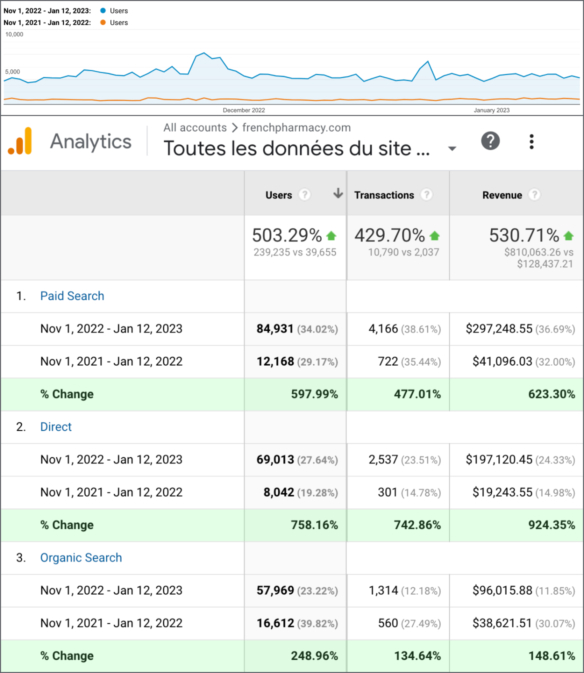
Another piece of the foundation is real-time reporting. I keep a dashboard open during product launches or big promotions. Watching traffic source monitoring in real time lets me catch issues immediately. If a paid ad campaign sends visitors to a page that loads slowly, I see the bounce rate spike within minutes. I can pause the ad, fix the page, and relaunch without wasting the entire budget. Real-time data is not just a nice feature. It is a safety net.
Reading the Signals in Your Data
Once your tracking is in place, the next step is learning what the numbers actually tell you. Many people look at total visits and call it a day. But total visits without context can be misleading. A huge spike in traffic might come from a single viral post, but if those visitors all leave immediately, you have gained nothing. You need to look deeper.
I start with the basics: which sources drive the most sessions? Then I compare that to which sources drive the best user behavior. For instance, organic search might be your largest source, but if those visitors have a high bounce rate and low time on site, your content might not match the search intent. On the other hand, email campaigns often have lower volume but much higher engagement. That tells you your email list is a valuable asset worth nurturing.
I also pay close attention to conversion rate by source. A source that brings in a small number of visitors but converts at 10 percent is often more valuable than one that brings thousands of visitors with a 1 percent conversion rate. This is where attribution models come into play. A simple last-click model might credit the final source before a purchase, but that can overlook the earlier touchpoints that built awareness. I use a combination of first-click and linear attribution to get a fuller picture. Traffic source monitoring gives me the data to choose the right model for each campaign.
Connecting Traffic Sources to User Behavior
Numbers alone are not enough. You need to understand the human side of the data. That means looking at what visitors actually do once they land on your site. Tools like heatmaps and session recordings let you watch real users navigate your pages. I once ran an A/B test on a landing page that was getting a lot of traffic from social media. The heatmap showed that almost no one scrolled past the first fold. The session recordings confirmed it: visitors saw the headline and the image, then left. The page was not matching the expectation set by the social media post.
By combining traffic source monitoring with user behavior tools, I could see exactly where the disconnect happened. I redesigned the landing page to match the tone and promise of the social content, and the conversion rate doubled. Without those recordings, I would have kept guessing. Funnel analysis helps too. You can see at which step visitors from different sources drop off. Maybe organic search users add items to a cart but never check out, while paid ads users rarely even click "add to cart." Each source needs a different optimization strategy.
Practical Tactics for Improving Each Channel
Once you know where your traffic comes from and how those visitors behave, you can start making targeted improvements. Here are a few approaches I have used successfully:
- Organic search: Use SEO tools to find the keywords driving traffic, then improve those pages with better content, internal links, and clearer calls to action. Monitor your organic click-through rate in search console data.
- Paid ads: Run A/B tests on ad copy and landing pages. Use UTM parameters to track which ad variation delivers the best conversion rate. Pause underperformers quickly.
- Social media: Tailor your landing pages to match the platform culture. What works on LinkedIn often falls flat on Instagram. Use real-time reporting to see which posts drive actual visits versus just likes.
- Email campaigns: Segment your list and test subject lines. Email traffic tends to have high intent, so make sure your landing pages match the promise in your email copy.
- Referral traffic: Build relationships with partners whose audiences align with yours. Track which referrals lead to engaged users, not just a quick visit.
When Data Deceives You
No tracking system is perfect. I have seen cases where a spike in traffic turned out to be bot traffic from a scraper. Google Analytics often filters out known bots, but not all of them. If you see a sudden jump in traffic from a single obscure source, investigate before celebrating. Check user behavior metrics. If the bounce rate is 100 percent and the session duration is zero seconds, it is probably not a real person.
Another pitfall is over-relying on a single metric. I once optimized heavily for click-through rate on a paid campaign. The clicks went up, but the conversion rate tanked. The ads were so clickbaity that they attracted curiosity clicks, not genuine interest. Traffic source monitoring helped me see the full picture. I shifted my focus to cost per acquisition instead of click-through rate, and the campaign became profitable again.
Finally, remember that attribution is never perfect. A visitor might discover your site through an organic search, read a blog post, then see a retargeting ad on social media, and finally convert after an email reminder. No single source deserves full credit. Using a combination of attribution models gives you a more balanced view, but you still need to make judgment calls based on your business goals.
Building a Habit of Continuous Monitoring
Traffic source monitoring is not a one-time setup. It is an ongoing practice. I schedule a weekly review of my analytics. I look at trends over the past seven days, compare them to the previous month, and note any anomalies. If a channel suddenly drops off, I investigate. Maybe a technical error broke the tracking, or maybe a competitor outranked me. If a channel suddenly spikes, I dig into why. Often the answer reveals an opportunity to double down.
I also keep an eye on the broader landscape. New social platforms emerge, search algorithms change, and ad costs fluctuate. What worked six months ago might be ineffective today. By staying in the habit of regular review, I catch shifts early. I remember when a major social media platform changed its algorithm and cut organic reach drastically. My traffic from that source dropped by half overnight. Because I was monitoring daily, I shifted my budget to email campaigns and search ads within a week, minimizing the damage.
Final Thoughts on Making Data Work for You
The point of all this tracking is not to drown in numbers. It is to make smarter decisions with less guesswork. Traffic source monitoring gives you the clarity to invest where it matters and cut what is not working. Whether you run a small blog or a large ecommerce store, understanding your traffic sources is the first step toward better marketing.
Start with the basics: set up UTM parameters, connect your analytics, and look at your data weekly. Layer in heatmaps and session recordings when you want to understand behavior. Use A/B testing to validate your changes. Over time you will build an intuition for what your audience responds to, backed by solid evidence. That combination of instinct and data is hard to beat.